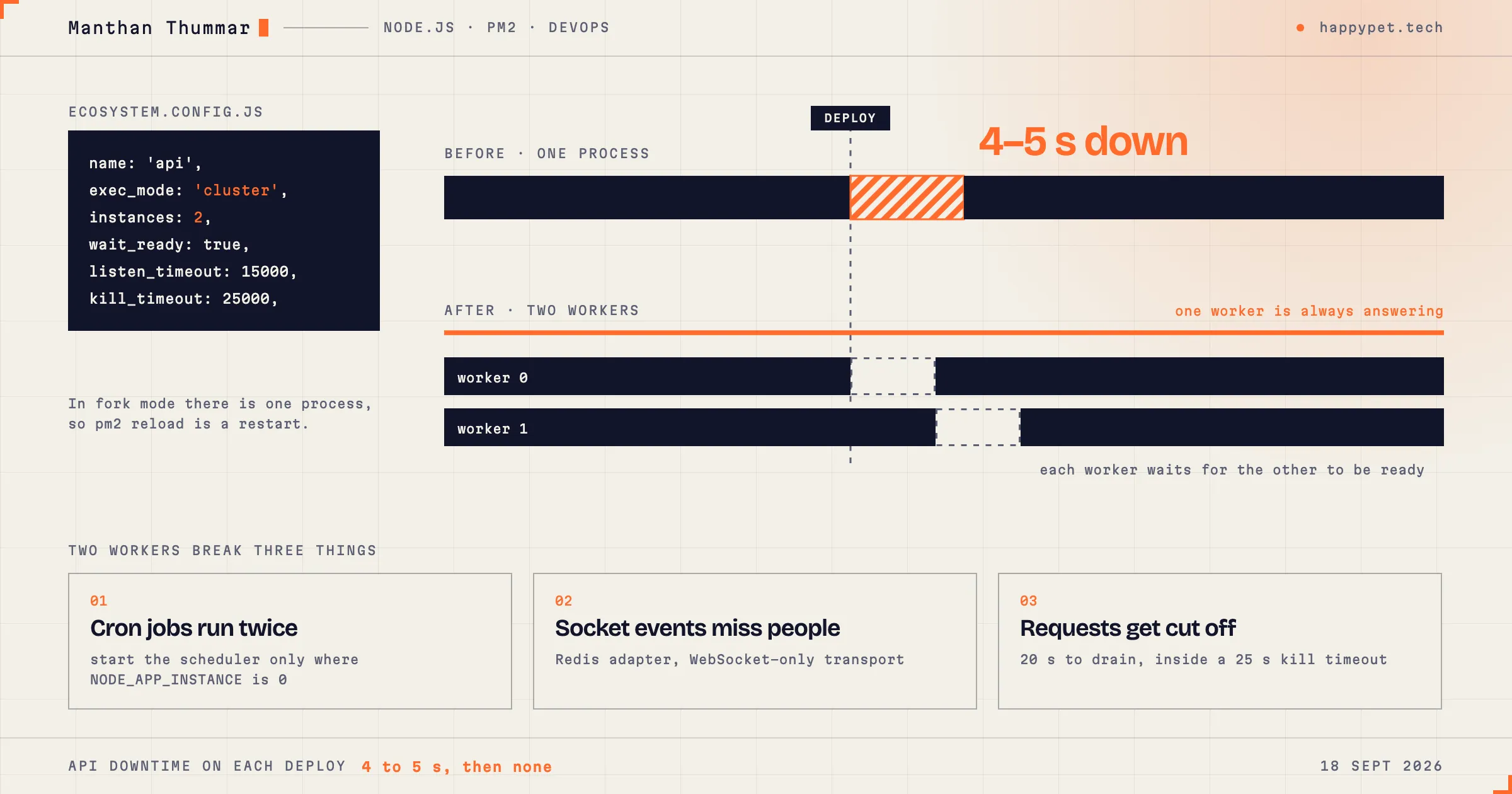
The Happy Pet Tech API is a Node.js and Express app. It runs on a server under PM2, a process manager for Node.
Until August, every deploy took the API down for 4 to 5 seconds. We deploy often, and during working hours. A groomer pressing “Save” in those seconds got an error.
This post is about removing that gap, and the three things that have to change when one Node process becomes two.
Why pm2 reload was not reloading
Our deploy step was pm2 reload. The name promises a reload without downtime. We were not getting one.
PM2 can run an app in two modes. In fork mode there is one process. In cluster mode there are several copies behind one port. A zero-downtime reload works by starting a new copy before stopping an old one. That needs at least two copies.
We were in fork mode, with one process. There, reload does the same as restart: stop the process, start it again, and wait for it to boot. That was our 4 to 5 seconds.
The fix is a config file:
// ecosystem.config.js
module.exports = {
  apps: [
    {
      name: 'api',
      script: 'src/index.js',
      exec_mode: 'cluster',
      instances: 2,
      wait_ready: true,
      listen_timeout: 15000,
      kill_timeout: 25000,
    },
  ],
};
instances: 2 gives PM2 something to rotate. wait_ready: true tells PM2 not to trust a new process until the process itself says it is ready.
One thing to know before you try this: PM2 cannot turn a fork-mode process into a cluster with reload. The first time, you have to pm2 delete the app and pm2 start it from the config. That one switch has downtime. Plan it.
With two workers, deploys stopped being visible to users. But an app written for one process makes assumptions, and two workers break three of them. We changed these in the same release.
1. Cron jobs would run twice
Our API schedules jobs with node-cron: reminders, template status checks, cleanup. The schedule is set up when the app starts.
Two workers means the app starts twice. Every job would be registered twice, and a customer would get two reminders.
The fix uses a variable PM2 gives each worker, NODE_APP_INSTANCE. It is 0 for the first worker, 1 for the second. Only worker zero runs the scheduler:
// simplified
if (process.env.NODE_APP_INSTANCE === undefined || process.env.NODE_APP_INSTANCE === '0') {
  startCronJobs();
}
This is the simplest fix, and it has a weakness I accept for now. If worker zero is the one restarting when a job is due, that run is missed. For our jobs, which repeat every few minutes, that is fine.
2. Socket events would miss people
We use Socket.IO for live updates: a new WhatsApp message, a new booking, a changed badge count.
With one process, every connected browser is in that process’s memory. With two, a browser is connected to one worker, and the event may be emitted from the other. Without a fix, about half of the live updates would go nowhere.
Two changes handle it.
First, the Redis adapter for Socket.IO. When a worker emits an event, the adapter publishes it through Redis, and every worker delivers it to its own connected browsers.
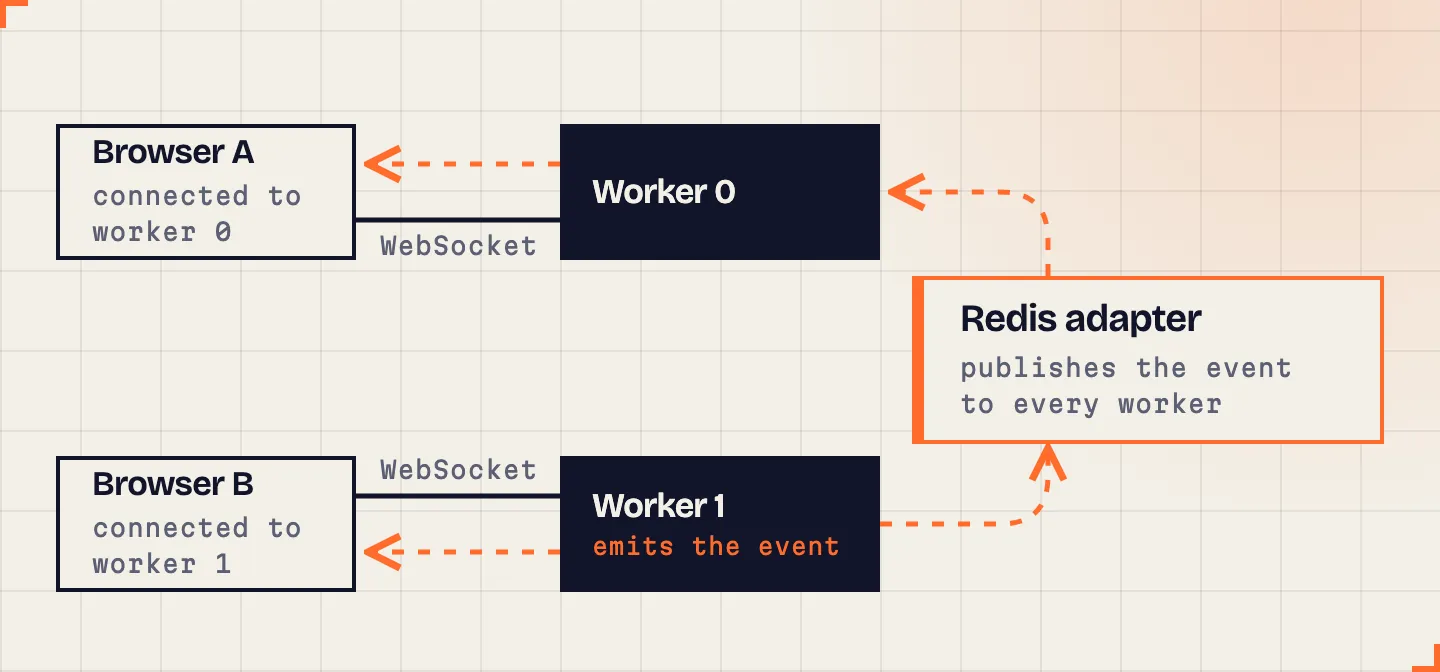 Browser A is connected to worker 0. An event emitted from worker 1 reaches it only because the adapter passes it through Redis.
Second, the transport. Socket.IO normally starts with HTTP long-polling and upgrades to WebSocket. Long-polling makes several separate HTTP requests, and with two workers and no sticky sessions, those requests land on different workers, and the handshake fails. We set the client to WebSocket only. A WebSocket is one long connection, so it stays on one worker.
const socket = io(API_URL, { transports: ['websocket'] });The same reasoning applies to anything that lived in one process’s memory. We had a permission cache there. With two workers, a permission change would reach one worker and the other would keep the old value. Shared state like that moved to Redis, with one rule: if Redis is down, read from the database. Redis being down must make things slower, not broken.
3. Requests get cut off during a reload
A reload starts a new worker and then tells an old one to stop. If the old one is in the middle of a request, that request dies.
Most requests take milliseconds, so this is rare. But we generate PDFs and reports, and those can take many seconds.
In September we added a proper shutdown. It has two halves.
Starting. A new worker tells PM2 it is ready only after the database is connected and the server is listening:
server.listen(port, () => {
  if (process.send) process.send('ready');
});
Before this, PM2 would send traffic to a worker that was still connecting to the database.
Stopping. When PM2 asks a worker to stop, the worker:
- stops its cron jobs,
- answers the health check with 503, so nothing new is routed to it,
- lets running requests finish,
- closes its queues, Redis and the database,
- exits.
The worker gives itself 20 seconds for this. PM2’s kill_timeout is 25 seconds. The gap is on purpose. If a request is still running after 20 seconds, the app gives up on it and writes a log line saying which one. If the numbers were the other way round, PM2 would kill the process first, and a slow report would vanish with no trace.
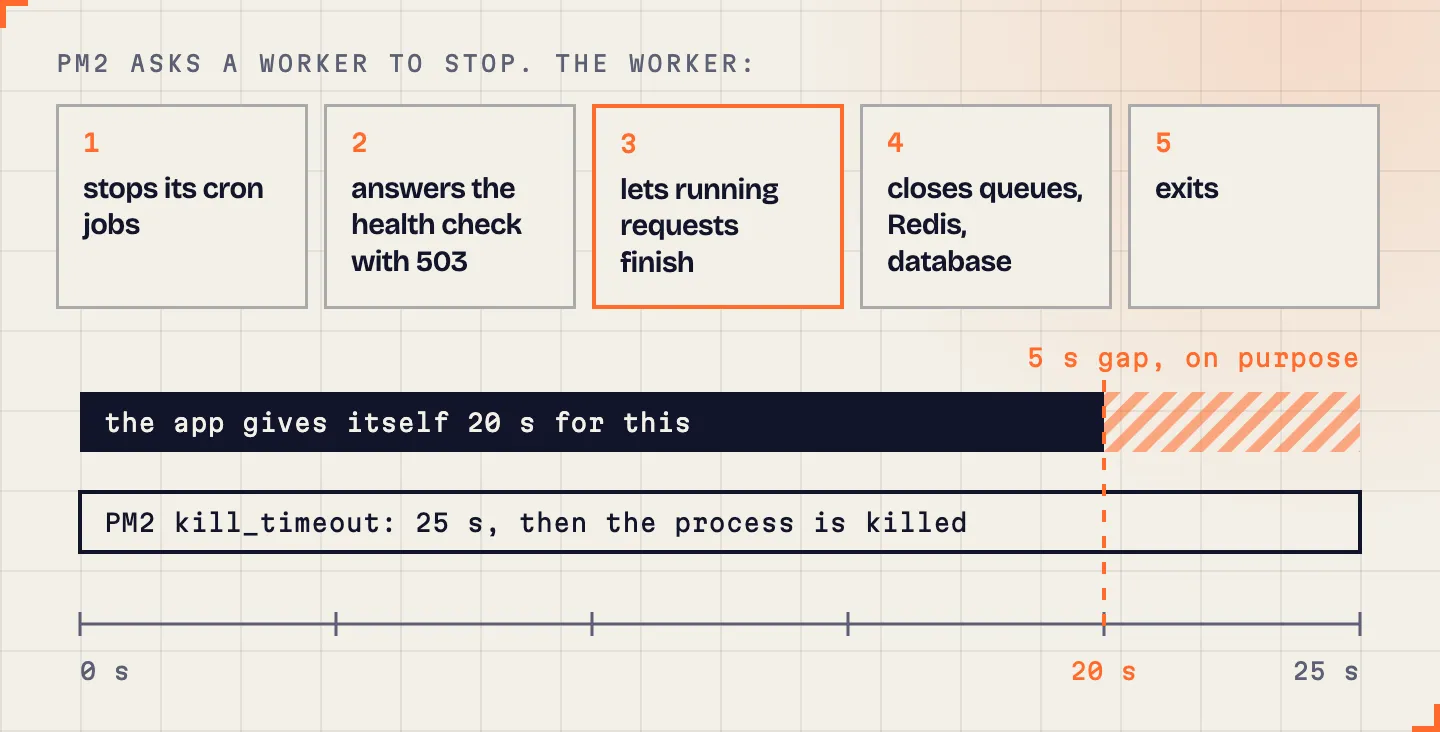 The five steps of a shutdown, and the two timeouts around them.
What CI checks before any of this
A safe reload does not help if the code being reloaded is broken. Since September, every push to GitLab runs lint on the changed files and the full test suite.
We added it for a specific reason: local git hooks can be skipped with one flag, and CI cannot. The lint step covers only changed files because the old code has a backlog of warnings, and a check that always fails teaches people to ignore it.
We also have a Docker pipeline in GitLab CI that builds an image, pushes it to a registry and deploys it over SSH. Building that image taught us two things that may save you a day:
- Our API makes PDFs with Puppeteer, which needs a real Chrome. On a slim Node image that means installing Chrome’s system libraries and fonts by hand. Without the fonts, text in other scripts and emoji print as empty boxes. We added Noto fonts for that.
- Installing the AWS command line tool inside an Alpine image failed in several different ways in one day. We stopped installing it. The pipeline now runs the official AWS CLI container for the one command it needs.
One more thing: old tabs after a deploy
After a front-end deploy, a user with a tab open since morning has yesterday’s JavaScript. When they go to a new page, the browser asks for a file that no longer exists, and the page fails.
Two things handle this. The build gets a deployment ID, the same value at build time and at run time, so Next.js can tell that the client and server are from different builds. And a small piece of code listens for a failed chunk load and reloads the page once, so the user gets the new version.
The short version
| Problem | Cause | Fix |
|---|---|---|
| 4 to 5 s down on each deploy | One process, so reload is a restart | Cluster mode, 2 workers, wait_ready |
| Cron jobs would run twice | Scheduler starts in every worker | Run it only where NODE_APP_INSTANCE is 0 |
| Live updates would be lost | Browsers and events on different workers | Redis adapter, WebSocket-only transport |
| Stale cached permissions | Cache lived in one process | Shared state in Redis, database as fallback |
| Requests cut off on reload | Worker stopped mid-request | Ready signal, drain, 20 s app timeout inside 25 s kill timeout |